


Amazon Search Query Performance gives you a clearer view of shopper behavior than guesswork ever will. It shows where your products appear, where shoppers click, and where they buy. That makes it one of the best tools for tightening Amazon SEO, PPC, and listing updates.
Most sellers look at it too late, or they only scan the top few queries. Used well, amazon search query performance data tells you which terms deserve more traffic, which pages need work, and which ads are wasting spend. If you want to make better decisions in 2026, start with the report that shows how shoppers move through search.
Start with the report view that matches your goal
You’ll find the dashboard in Seller Central under Brands > Brand Analytics > Search Analytics > Search Query Performance. Amazon’s own Search Query Performance dashboard help page is the best place to confirm the current navigation.
Start with Brand View when you want the big picture. It helps you see how your whole catalog performs against a query. Switch to ASIN View when one product needs attention. That view is better for listing fixes, launch work, and testing a single keyword set.
A simple weekly export is enough for most sellers. Pick a recent date range, then download the CSV so you can sort by impressions, clicks, carts, and purchases. If a query keeps showing up but your numbers stay flat, that term deserves attention.

Read the core metrics in plain English
The report looks busy at first, but the meaning is simple. Each metric tells you where shoppers drop off. That is why the data is useful for both SEO and ads.
| Metric | What it means | What a weak result usually points to | Best next move |
|---|---|---|---|
| Impressions | How often you showed up in search results | Low visibility or weak rank | Improve keyword coverage or ad support |
| Clicks | How often shoppers chose your listing | Title, main image, or price issue | Test the image, title, and offer |
| Add-to-cart | How often shoppers added the item | Page trust problem or offer gap | Review bullets, price, reviews, and A+ content |
| Purchases | How often the query led to sales | Conversion mismatch or poor fit | Check the listing, variation, and traffic quality |
A low impression share means you are hard to find. A low click share means shoppers see you, but prefer someone else. A low purchase share means the page is not closing the sale.
The gap tells you where the problem lives, search visibility, click appeal, or conversion.
For a practical read of each field, this breakdown of the report explains the funnel logic in a useful way. Use it as a cross-check when you build your own spreadsheet.
A good shortcut is this: impressions are exposure, clicks are interest, carts are intent, and purchases are proof. Once you think in that order, the report becomes much easier to use.
Turn funnel gaps into listing fixes
The report becomes useful when you tie it to action. If the funnel breaks, fix the stage where shoppers leave.
If you have high impressions and low clicks, the problem usually sits in the search results. Your main image may blend in. Your title may be too vague. Your price may look off next to the competition.
If you have high clicks and low carts, shoppers are interested, but not convinced. This is where bullets, A+ content, reviews, price, and variations matter most. A better image set can help too, especially on products with clear feature differences.
If you have high carts and low purchases, the issue is close to checkout. Check stock, shipping speed, coupon setup, review count, and variant selection. Sometimes the product is good, but the offer feels risky.
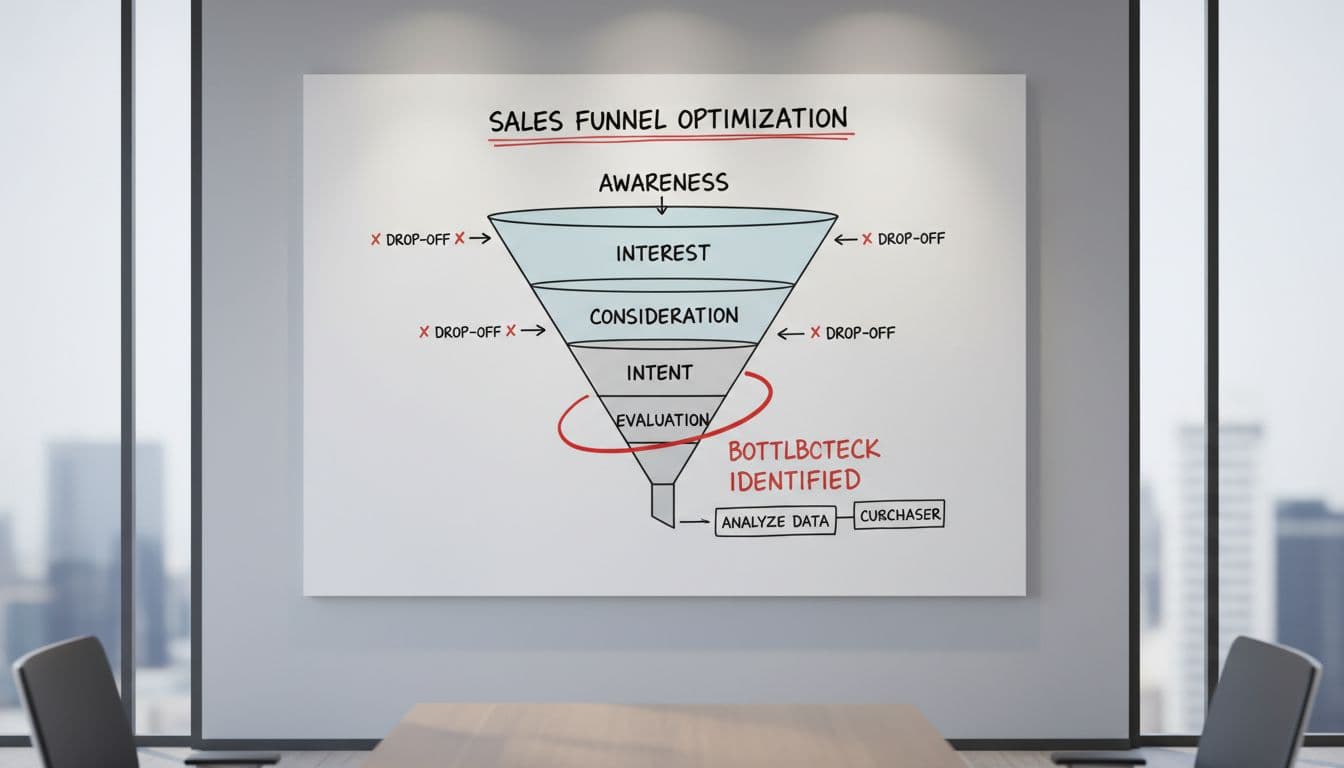
Use the report to rank your listing work. A weak title on a query with high traffic should come before a minor A+ tweak. A cart-to-purchase gap on a high-value query should come before a color update. That order saves time and budget.
Use the data to sharpen PPC and organic rank
Search Query Performance is useful for organic growth because it shows where you already have demand. If a term brings purchases but your impression share is low, you have a clear opportunity. That query is a strong candidate for sponsored campaigns and listing updates.
Here is a simple rule. If a query already converts, support it harder. Add it to exact-match PPC, test bid increases, and make sure the phrase appears naturally in the title or bullets when it fits the product. Then watch whether impression share moves up over the next few weeks.
If a term gets clicks but weak purchases, stop pushing it blindly. The keyword may be too broad, or the page may not match the shopper intent. In that case, lower bids, cut wasted placements, or move the term into a lower-priority ad group.

A practical example helps. Say your kitchen knife listing gets strong purchase share for “chef knife set” but weak impression share. That means people who find you buy, but Amazon is not showing you enough. Put budget behind that term, then improve the listing around it. If the share rises and CPA stays healthy, keep scaling.
The same logic works in reverse. If a query drives traffic but the purchase rate stays thin, it should not guide your PPC budget. It may look tempting because of search volume, but volume alone does not pay the bills.
Compare Search Query Performance with other Amazon reports
SQP is not the only report worth checking. It works best alongside Brand Analytics and Search Term reports, because each one answers a different question.
| Report | Best for | Main difference |
|---|---|---|
| Search Query Performance | Seeing the full search funnel for queries | Shows impressions, clicks, carts, and purchases by query |
| Brand Analytics | Broader brand and category analysis | Gives a wider view of shopper behavior and search patterns |
| Search Term reports | Ad performance by term | Focuses on your paid traffic, not the market-wide query funnel |
Use SQP when you want to know where your products win or lose in search. Use Search Term reports when you want to trim bad ad spend or scale high-converting terms. Use Brand Analytics when you want a wider market lens.
A useful workflow is to start with SQP, then move into ad reports. If a query performs well in the market and also converts in your ads, that term should move near the top of your list. For more workflow ideas, this practical guide from Keywords.am is a solid reference.
Build a weekly workflow you can repeat
You do not need a huge dashboard ritual. A short weekly routine works better, because it keeps the numbers fresh and easy to act on.
- Export Brand View for the last 7 or 14 days.
- Sort by purchases, then scan for queries with strong sales.
- Flag terms with high impressions and weak clicks.
- Flag terms with clicks but weak carts or purchases.
- Match each problem to one action, listing change, bid change, or budget shift.
- Review the same queries again the next week.
That loop helps you spot trend changes early. It also stops you from making too many edits at once. If one keyword is strong but hidden, push it. If one keyword draws traffic but no sales, cut it back. If one ASIN underperforms on a key term, fix the page before spending more.
Keep a small note beside each query, too. Write down the problem, the action, and the date. After a few weeks, you’ll see patterns that make future decisions faster.
Conclusion
Amazon search query performance works best when you treat it like a decision tool, not a report to skim and forget. The metrics show where shoppers see you, where they click, and where they buy, so the next move becomes much clearer.
If you use it weekly, compare it with ad reports, and tie each gap to a specific fix, you’ll spend less time guessing. In 2026, that kind of focused analysis is what helps strong listings pull ahead.