

If supplier updates live in email, lead times live in your head, and purchase orders live in a spreadsheet, stockouts aren’t bad luck. They’re a system problem.
The best Amazon FBA supplier tools in 2026 help you track what matters: who you buy from, when inventory should ship, what arrives late, and when to reorder before Amazon punishes you with lost sales. For most sellers, the smart move isn’t one giant platform. It’s the right tool for the bottleneck you have today.
That makes the choice easier, because the best option depends on where your process breaks first.
What strong supplier management looks like in 2026
Amazon sellers now expect more than a basic stock alert. A useful supplier tool should connect purchase orders, supplier lead times, inbound shipments, and sell-through data. If it can’t do that, you’re still guessing.
Recent 2026 Amazon seller tool stacks point in the same direction: most growing brands now combine a few focused apps instead of forcing one suite to handle sourcing, purchasing, warehouse control, and forecasting all at once.
If a tool can’t tie lead time to demand, it won’t save you from a stockout.
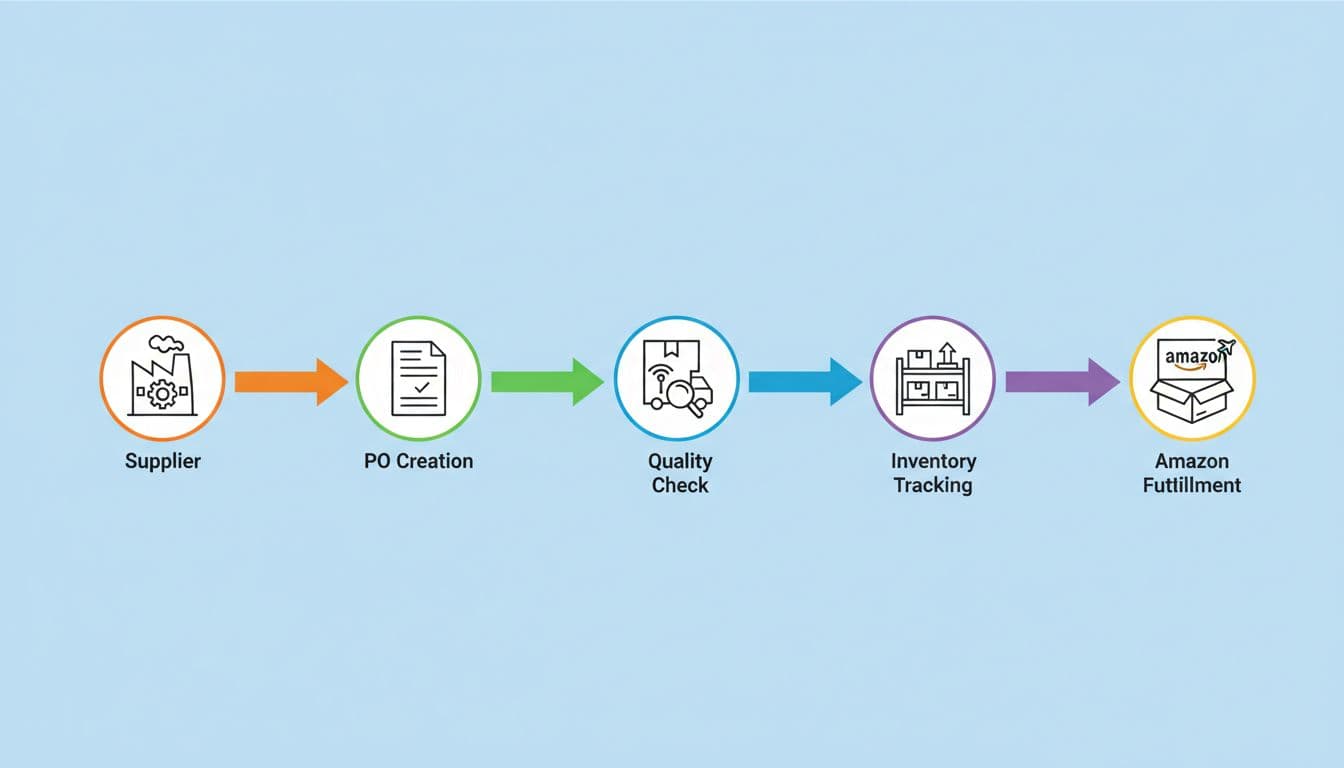
For FBA teams, that usually means five core jobs. First, you need supplier communication and PO tracking. Next, you need reorder timing based on real lead times, not hope. Then you need inventory visibility across warehouses and inbound shipments. After that comes sourcing support, such as finding vetted suppliers or checking MOQs. Finally, you need some way to track QC and receiving issues, even if that piece still sits outside your main Amazon stack.
The best Amazon FBA supplier management tools in 2026
This quick table shows where each tool fits best.
| Tool | Best at | Pricing snapshot | Main limitation | Best fit |
|---|---|---|---|---|
| RestockPro | Reorder planning and POs | From about $99/mo | Too much for tiny catalogs | Scaling brands |
| Amazon Business | Purchasing controls and supplier buying | Free account, Business Prime optional | Not a full ops system | Small to mid-size teams |
| SKUVault | Inventory and warehouse visibility | Plan or quote-based | Better for ops than sourcing | Scaling and larger ops |
| Profit Guru | Supplier discovery | Varies | No PO or QC workflow | New and early-stage sellers |
| Sellerboard | Budget inventory and repurchasing | Varies | Light supplier collaboration | Small sellers |
The big takeaway is simple: no single tool owns every part of supplier management. That isn’t a flaw. It’s how the market works in 2026, as shown in broader Amazon seller tools roundups.
RestockPro is still the strongest pick for reorder control
RestockPro does one job better than most tools in this space: it helps you decide when to buy again and how much to order. It uses sales velocity, supplier lead times, Amazon receiving delays, and safety stock to make that call.
It also supports purchase orders, shipment tracking, and multiple warehouse views. That makes it a strong choice for private label sellers with 10 or more SKUs. The weak spot is depth outside replenishment. It won’t replace a QC platform or a full ERP. Still, for scaling brands, it’s often the first tool that stops inventory chaos.
Amazon Business works well for controlled purchasing
Amazon Business isn’t a classic supplier management system, but it matters more than many sellers think. It helps teams compare suppliers, manage approvals, and centralize business buying under one account.
That’s useful when assistants, buyers, and founders all touch purchasing. Small brands can use it to bring order to spending. Mid-size teams can use it to set approval rules and keep records cleaner. The trade-off is scope. It helps with buying, not full supplier collaboration or factory-side tracking.
SKUVault is strongest when warehouse accuracy is the pain point
SKUVault shines when your supplier process breaks after the order is placed. If inbound stock goes missing, counts drift, or FBA prep gets messy, this tool gives better visibility across inventory movement and warehouse handling.
It’s a better fit for scaling brands and larger operations than for solo sellers. You get stronger operational control, but less help with supplier discovery or pre-shipment communication. In other words, SKUVault is about execution after purchase, not sourcing before it.
Profit Guru helps you find suppliers faster
Profit Guru is more about sourcing than management. It helps sellers find verified wholesalers and brands, compare MOQs, and check unit economics before they contact a supplier.
That makes it useful for new sellers, wholesale operators, and private label teams in the research phase. Its limit is obvious: once you start placing repeat orders, you need another tool to track POs, lead times, and inbound stock. Profit Guru helps you open the door. It doesn’t manage the relationship afterward.
Sellerboard is the practical budget option
Sellerboard isn’t a heavy supplier platform, yet it deserves a place here because many small FBA businesses need a light system first. It combines profit tracking with basic inventory views and repurchasing support, plus a QuickBooks connection for cleaner bookkeeping.
For a lean team, that’s often enough. However, supplier communication, QC, and PO collaboration stay shallow. Sellerboard fits small sellers who want more structure without taking on a larger operations stack too early.
If you’re already using Helium 10 or Jungle Scout, keep them for research and alerts. They help upstream. They don’t replace dedicated Amazon FBA supplier tools for ordering and coordination.
Which tool fits your business stage best
Small sellers usually need clarity more than complexity. If you’re still testing products or changing suppliers often, start with Profit Guru for sourcing and Sellerboard for basic control. Amazon Business also makes sense when more than one person buys supplies or samples.
Scaling brands usually hit a different wall. They know what to reorder, but timing slips, containers run late, and inbound stock loses shape between factory and FBA. That’s where RestockPro stands out. Add SKUVault if warehouse movement or prep accuracy has become a second problem.
Larger operations need cleaner handoffs across buyers, warehouses, and finance. In that case, SKUVault plus Amazon Business is a solid base, because one tool handles inventory control while the other keeps purchasing organized. Many teams also borrow ideas from broader workflow guides like this Amazon automation tools guide when repetitive supplier tasks start eating hours every week.
One honest warning matters here: QC is still the gap. Most Amazon-first tools don’t fully cover pre-shipment inspections, defect photo logs, and supplier corrective action tracking. So if factory quality is your pain point, pair your main tool with a simple inspection workflow rather than expecting one app to do it all.
The best choice comes down to one question: where do you lose control first, before the PO, after the PO, or when stock lands?
Pick the tool that fixes that single weak spot, and your whole supply chain gets easier to trust. That’s the real value of Amazon FBA supplier tools in 2026.
Start with one problem, one tool, and one cleaner process. Then build from there.